-
Free Weekly Album: Mötley Crüe – Greatest Hits
Another week brings another album that we can all download, courtesy of Google, for free. Yes, for free (crazy right?).
This time Mötley Crüe’s 2009 album, The Greatest Hits, can become a part of your music library. Head on over to the Play Store and grab it before the download dissipates. Otherwise you’ll be paying $1.29 per song. The album has 19 tracks in all, which is a pretty legit deal considering that it’s even being offered for $Free.99 in the first place.

Every week Google has a free album available. I’ll do a better job at notifying you of what the free album of the week is since I tend to forget myself.
Image courtesy of Google
-
Google Gives You More Free Money on Your Android Phone
When Google initial released their mobile payment system, Google Wallet, $10 was credited to one’s account upon activation of the application. This decision was made in hopes of increasing the adoption rate of a pleasant feature now found in many Android devices. If you missed out on this opportunity, fear not! There is one more way to get more free money courtesy of Google.

It’s no secret that Google strives to learn everything about you in order to provide you with key information to be used in certain places such as Google Now. In order to learn more about its customers in general, major corporations issue surveys. Google is aiming to do the same thing with their Opinion Rewards app. Rewards is pretty straightforward and is the easiest app I’ve ever used. Once the app is installed and downloaded, the process is as follows:
- Open app
- Sign in
- Answer questions
- Done
If you’d like to give your eyes a reading break, you can watch me do a quick review off the app.
That really is the synopsis of the app. Periodically the Rewards icon will appear in your notification drawer, prompting you to take as survey. The surveys are usually 1 – 5 questions long and take no more than 2 minutes total to complete. After finishing the survey, a counter will appear to show how much money you earned for answering the questions. This money directly links to your Google Wallet account used in the Play Store and can be used to purchase apps, e-books, music or movies.

Although the money is free, don’t expect to earn $5 or any other high monetary amounts. I usually receive an average of 33 cents per survey. That doesn’t sound like much, but it will add up over time.
If you want to complain about receiving less than 50 cents for your time then please, by all means, go ahead and use your own money to your heart’s content. Rewards is a simple way for Google to learn about demographics in exchange for giving users a few dollars for their time.
Download the app and get your free money today!
-
Windows Phone 8.1 Keyboard Overview: It’s Fantastic!
Considering the fact that it is still a relatively young operating system, Microsoft has made positive strides with each iteration and this keyboard is no exception. In Windows 8.1 the default system keyboard still remains as the only option available, but it is accompanied with some welcomed changes and improvements to existing features. I’ve been using it for a few months new while running the Windows 8.1 Developer Preview and it is without question my favorite keyboard to use on a smartphone.
If you’re an iPhone user, you’re accustomed to not having an alternative option if you’re unsatisfied with the keyboard. If you’re an Android user, you’re used to being able to try out a plethora of keyboards that swipe and creatively word prediction until coming across the one that suits you the best. Unfortunately, Windows Phone users have been in the same boat as Apple users. That is, until now (if you’d like to see a video review, scroll down a bit).
Tall Keys, Big Accuracy
The Windows phone keyboard gives everyone something that isn’t available on stock Android or iOS: taller keys. It may not sound like that big of a deal, but it’s one of those situations where a light bulb doesn’t go off until you actually experience it. I can remember the first time I typed on a Windows Phone 3 years ago and was amazed at how easy it was to type on. It’s great to see that Microsoft hasn’t changed the physical nature of their keys, and for good reason.

Emoticons and Prediction
Are you sick and tired of having to go to a secondary screen just to enter an emoticon? Windows phone removes this step by providing you with an emoticon directly in the suggestion field. For instance, if the word “run” is typed, an emoticon of a person running will appear and can be instantly selected to be placed into your current message.

Prediction Galore
The prediction of the Window Phone 8.1 Developer’s Preview is incredible. In fact there are countless times where I’ve been able to continuously select the predicted words one by one, and almost have the entire sentenced typed by the time I’m done. What’s even more miraculous is that the prediction is extremely accurate without having to be connected to your various Twitter, Facebook, Gmail or other social accounts.
Here’s my video review if you’d like to see it in action.
Don’t Lift a Finger
The newly face lifted keyboard adds the ability to swipe-to-text rather than consecutively pressing individual keys to spell a word. It’s very accurate and as the frequency of use is increased, the more it’ll become second nature to you.

Side Note: Microsoft thank you very much for not having the words float above the keyboard (a.k.a. dynamic preview). Who actually uses that?
The previous version was pretty good before, but now its borderline fantastic. Taller keys drastically increase one’s typing accuracy while being accompanied by a pleasant sound with each key press. The auto correction and suggestions combined with the new swipe-to-text implementation makes this keyboard fun to use. If your device is capable of upgrading to the Windows 8.1 developers preview, I highly recommend doing so. It’ll give you that new phone feeling that’ll put a smile on your face every time.
-
Exclusive Destiny Beta Award This Saturday, From Bungie
If you’re looking for the latest, big first person shooter than you’re in luck. Destiny, Bungie’s latest big title (the team responsible for creating the Halo franchise), had its Beta released a couple of days ago and it’s available for everyone to download. It’s no longer restricted to certain individuals with access keys. Now Xbox 360, Xbox One, However, Destiny is more than a first person shooter. It’s more correct to say that it’s a massively-multiplayer-online-RPG-first-person-shooter. A video is worth 5,000 words, so check out the trailer to get a better idea of what Destiny is all about.
I’ve been playing it for a few hours and I like what I’ve experienced thus far. The music is fantastic, the graphics are very nice, the controls are solid thus far and the enemies have a certain attitude about them that makes it seem like someone behind the scenes is actually controlling them. Right from the get go you can customize your character and work your way up level by level in order to gain more armor, abilities, weapons and other characteristics that will improve overall skills. The download is 5 gigabytes on the Xbox 360 and 12 gigabytes on the PS4, so be sure you have plenty of space before downloading the Beta. If you don’t have much time to play, make sure that you at least play anytime between 2 PM and 6 PM Pacific Time in order to receive an exclusive Beta reward. Upon playing through the game, I ran across this message remind me to do so:

Enjoy playing Destiny! It’s shaping up to be a great game. If you’re looking for me, I’ll be online via Xbox 360 as DeRail275.
Today’s rally happens at 2:00 PM Pacific time. That’s Bungie time. Destiny Beta time. Play whatever you want. Appear anywhere in the game.
— Bungie (@Bungie) July 26, 2014
There’s more news here if you’d like some more specifics. It seems like the prize is a nameplate to prove that you were a part of the beta, along with 200 credits
-
The Good and Bad of the Android L Keyboard, Free Download
On June 25, 2014 Google unveiled a preview version of its new operating system. While there has been no official release date or name for the new Android version, they did provide a code name: Android “L.” Android L is the developer version of the O.S. so it’s nothing that Google is officially launching to your device just yet, but there are portions that you can try right now. One piece that I’m always interested in is the keyboard.
This very second you have the ability to let you fingers experience the Android L keyboard. Rather than having to pull the file for yourself, Shen Ye has been gracious enough to pull the .apk and create a downloadable app in the PlayStore. 
Look
After installing the keyboard you should notice an immediate difference in the keyboard’s appearance. The colors are favor the pastel pallet (think Easter colors), which Google is referring to as “material design” elements. You’ll also notice that the keys are no longer individualized as in the previous iteration. Instead, they have no edges or defined borders.

Operation
Sticking with the remains of its predecessor, the Android L keyboard allows the user to swipe over each letter in order to spell a word. However, L takes this a step further by allowing you to type an entire sentence without lifting your finger. The technology used to operate this feat is none short of amazing. It does take a deal of skill to become consistently good at it. Believe me, it’s just as hard as it sounds and I consider myself to be a very good swipe-to-texter.
Prediction
One major leap that Google has made with the new keyboard is with its prediction. With the current keyboard there are numerous times when the prediction of my next spelled word is unquestionably wrong. In fact, it will often not even predicted an upcoming word.
The Android L keyboard does a much better job at foreseeing what the next typed word will be. If ou see the word predicted correctly, just tap it and Google will predict the next word in the sentence. Eventually the operating system will learn your various phrases to the point that you will be able to continually tap the suggestions without having to type any words at all. This high prediction rate comes from Android looking at your Google services, such as Gmail and Google Plus, to learn your sentence structure.

As good as the keyboard is, there are some steps backward that were taken in its production. I will explain further in the next article. Or if you don’t feel like waiting you can just check out my video review at the beginning of this article.
-
A BBQ Isn’t a BBQ Without These Smartphone Tips
The 4th of July is upon us! People will be hosting a plethora of barbeques over the next few days. If you’re unsure of what to grill this summer or if you’d like to try something new, check out the Barbeque Grill Recipes Free app in the Play Store. Equipped with varieties of recipes, this app is great for not only this weekend but for the entire summer or any other time you’d like to grill out. In case you see something in the app you’d like to try but your family member, friend or significant has already left for the store, Barbeque Grill Recipes enables you to share shopping lists.
If you need a new device to go with those new recipes, the Samsung Galaxy S5’s 16MP camera will enable you to show off those great grill marks. This camera is coupled with a dustproof screen and is water resistant, so no need to worry about it if you need to quickly dispose of that out of control fire from the grill. It’s available at all wireless carriers, including Cricket Wireless.

All of that delicious food on the girl can quickly take a turn for the worst if it ends up getting burnt. Cooking Timer for Windows Phone (see, I haven’t forgotten about ya’ll) provides assistance during outdoors for BBQ events as well as for kitchen use. With 4.5/5 stars in the Windows Phone Market place, the app is graced with the ability to run multiple timers simultaneously and even lock screen controls. To top it off, the Cooking Timer will also run when you screen is off to prevent battery drain due to your device’s display. It works with Windows Phone 8.1 as well.
If you’re a Windows Phone fan and would like to possibly one up the Galaxy S5 then the Nokia Lumia 1320 may be up your alley. The only U.S. carrier with this 6″ device is Crickett, which continues their strong lineup of smartphones. What stands out to me the most is the 3,400 mAh sized battery. There’s absolutely no way you’ll be at a barbeque wondering if your battery will last. If you’re interested in picking one up, Cricket is offering new customers $50 off most smartphones after a mail-in-rebate with the Cricket Visa® Promotion Card.

Food: check. Friends & Family: Check. Smartphone to capture great moments: check. Music…ah that’s what I forgot!
The BoostPlus Audio Speaker amplifies the sound of your mobile device to get the party started. Small enough to fit in a purse or small bag, this cool and convenient accessory also gives the option of wireless or wired connectivity.
Enjoy that barbeque, family and friends while having a safe holiday!
-
Do This Before You Upgrade to Windows 8.1
If you have a desktop or laptop running Windows 8, you can upgrade to Windows 8.1 for free. For those of you who miss the start bar, it’s back! That alone is enough to upgrade to 8.1 as far as I’m concerned.
However, be warned. As with any big update, I caution you to think about one thing before you hit the download button. Think about all of the programs and devices that you have downloaded onto your computer. What would happen if you updated to Windows to 8.1 but one of those programs, which you rely on so heavily, isn’t compatible? Thankfully, there is a solution for this.
Microsoft has provided it’s user’s with a Windows 8.1 Upgrade Assistant. This tool will inform you of which of your current programs will have no issues on the upgraded operating system and vice versa.

After installing, it took 20 – 30 minutes for the compatibility of all of my applications and devices to be revealed. Clicking on the details link allows you to view the list of incompatible and compatible devices.

Luckily all of my apps are compatible after updating theme, so I’m going to proceed with installing Windows 8.1. Hopefully you’ll find the Windows 8.1 Upgrade Assistant as useful as I did and will have the opportunity to install the upgraded operating system. Three cheers for the return of the start menu in the task bar!
-
Free 3 Day Xbox Live Gold Trial
Hey ya’ll! I know I haven’t posted in a while, but at least I’ve come back with a post that will interest most of you. Over the course of the past few months I’ve been getting friend requests (which I greatly appreciate) and questions asking me if I have any Xbox Live codes due to my previous post that gave you a free month of Xbox Lild. Until now, I haven’t ran into any.
I was browsing through Walmart and not even 1 minute in I came across this huge Xbox advertisement that Frito-Lay is promoting. In order to get a three day Xbox Live Gold Trial, all you have to do is:
- Purchase 2 bags of Frito Lay products (Doritos, Lays, Ruffles, Cheetos or Funions)
- Head over to BeSnackReady.com and enter the code from the bag to redeem your Xbox Live trial.

I haven’t come upon any easier way to get a code (a 3 day one at that) so go ahead and purchase 2 bags of chips for yourself. Heck, you don’t even have to eat them. Give them to someone else. Just make sure the bag is specially marked for the promotion like the picture above. If you’d like to be notified of special deals like this so that you don’t miss out, be sure to fill out the form on the right side of the page to get some cool exclusives. As always, if have any questions feel free to leave a comment.
I’ll see you all online!
-
Qi Charger, An Inexpensive Wireless Charger Just for You
Remember when house phones had cords and you had to troll the telephone wire across the house just to talk in another room? If you’re not old enough to remember those days, I’m sure you are very familiar with not being able charge your phone without sticking a cord inside of it. The word wireless is being refined with every passing year. The next phase in the cycle is having the ability to charge your phone wirelessly.
Although USB cords are aplenty the days and next to nothing, they still pose a burden to smartphone users. How many times have you attempted to plug a USB cord into your phone only to find out that it isn’t turned the proper way? A device can be rendered useless simply due to the fact that its USB port is broken from the constant insertion and remove of the cord. Without a USB port files cannot be transferred from your phone to your computer. As a matter of fact, it can’t be charged without one! This is true unless your smartphone is one of the few that can be charged wirelessly through inductive charging. The main inductive power standard these days is Qi (Ch-ee).
With a Qi wireless charger, charging your phone is as simple as placing your phone down on the pad. Depending upon the voltage output of your chosen pad the wireless unit will charge your phone every bit as fast as the wall charger that came with your smartphone. The great thing about having a Qi charger is that it can be used with several devices because it is a standard. The Nexus 4, Nexus 5, Droid DNA, Lumia 920, Lumia 1020, Nexus 7, Galaxy S 4 and Galaxy S 5 are just some of the devices out there that will work with any Qi Wireless charging pad. They’re very handy to have on the nightstand near your bed. Rather than having to search for a spot to plug a wire in, instead just set your phone on the pad and sleep the night away. I’ve taken the liberty to provide a few links for different Qi-Enabled Wireless chargers. None of these cost $50 like the one in Google’s Play store do. Hopefully you like the selections. If you have a favorite wireless charger that you enjoy, let me know in the comments and I’ll add it to the list.

Rectangular Shaped Black Qi Wireless Charger (this is the one I use in the video)
$26.98 with 2 day shipping 
Square Shaped Qi Wireless Charging Pad (similar to Google’s Official Nexus 5 charger)
$29.99 with 2 day shipping 
Spherical Shaped Qi Wireless Charger (similar to Google’s Official Nexus 4 Charger)
$30.99 with 2 day shipping 
Circular Qi Wireless Charger (comes in different colors) – $21.99 with 2 day shipping
– $21.99 with 2 day shipping (click to purchase) –$21.99 with 2 day shipping -
The Solution to “I Lost My Phone Last Night”
Happy New Year everyone! Now I’m no psychic but I do know that two following things are absolutely true.
- It’s 2014
- You, or someone you know of, lost their phone last night
If you have an Android device you absolutely have nothing to fear. If you have one a newer device (Jelly Bean 4.1 and above) then most likely Android Device Manager has been enabled for you. In the event that you absolutely have no idea what I’m referring to, the steps look something like this:

Follow these screens to get to the Android Device Manger
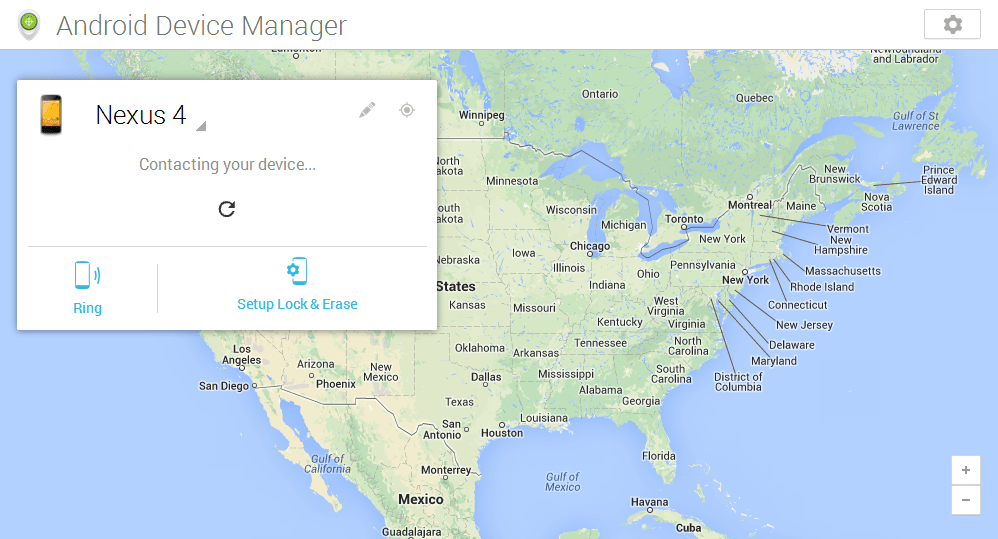
If you’ve never seen this screen before you still shouldn’t be worried. By default this option should already be checked off. Now all you need to do is head over to the Manage My Device page and use the location feature to find it. From there you’ll be able to make your smartphone ring, change the lock screen settings and even wipe your device.

The map will look something like this while your phone is trying being located
A cab, the bar, somewhere on a random street…it could be anywhere. If your phone ends up in some crazy unexpected place, feel free to let me know in the comments!

Jared is a simple, passionate tech enthusiast who loves to help people get the most from their Android smartphones. As a smartphone consultant, immediate help and saving money on accessories (cases, screen protectors, gadgets, etc.) are his forté. Feel free to connect with him on Google+ !